

In the competitive digital landscape, a high-performing website isn’t just an asset; it’s the engine of your business growth.
But like any engine, it requires regular maintenance to ensure it’s running at peak efficiency.
Many online guides offer surface-level advice, but true optimization demands a deep dive into every facet of your site’s health. This is where a comprehensive website audit checklist becomes indispensable.
This guide provides a detailed, step-by-step roadmap to diagnose hidden issues and unlock significant growth opportunities. It moves beyond basic checks to cover the critical pillars of a successful online presence.
You will learn how to systematically evaluate:
- Technical SEO and Site Performance: Uncover indexing errors and speed bottlenecks that suppress your rankings.
- On-Page SEO and Content Quality: Ensure your content is optimized, relevant, and engaging for your target audience.
- User Experience (UX) and Navigation: Identify friction points that cause visitors to leave and hurt conversions.
- Security and Privacy Compliance: Protect your site and your users’ data from emerging threats.
- Backlink Profile and Authority: Analyze your inbound links to build trust and domain strength.
We’ve designed this website audit checklist to be actionable, equipping you with the specific tools and insights needed to transform your website from a passive digital brochure into a powerful conversion machine.
A detailed audit is the first critical step toward dominating search results and achieving measurable business growth. Let’s begin the process of building your high-performance digital presence.
1. Technical SEO and Site Performance
The first and most crucial step in any comprehensive website audit checklist is a deep dive into your site’s technical foundation.
Technical SEO is the practice of optimizing your website’s infrastructure to help search engine crawlers find, understand, and index your pages more effectively.
A technically sound website is faster, easier to crawl, and provides a better user experience, all of which are powerful signals to Google.
Think of your website as a house. Technical SEO ensures the foundation is solid, the wiring is safe, and the plumbing works flawlessly.
Without this, no amount of beautiful interior design (on-page content) will matter if the house is structurally unsound. This audit focuses on elements like site speed, mobile-friendliness, crawlability, and the all-important Core Web Vitals.
Why It Matters
A strong technical base directly impacts your search engine rankings and user satisfaction.
For instance, AliExpress improved its conversion rates for new customers by an impressive 10.5% after reducing their page load time by 36%.
Similarly, Pinterest enhanced their perceived wait times by 40%, leading to a 15% increase in both search engine traffic and sign-ups.
These examples highlight a clear correlation: better technical performance leads to better business outcomes.
To help you visualize the most critical metrics at a glance, the summary box below highlights key performance indicators.
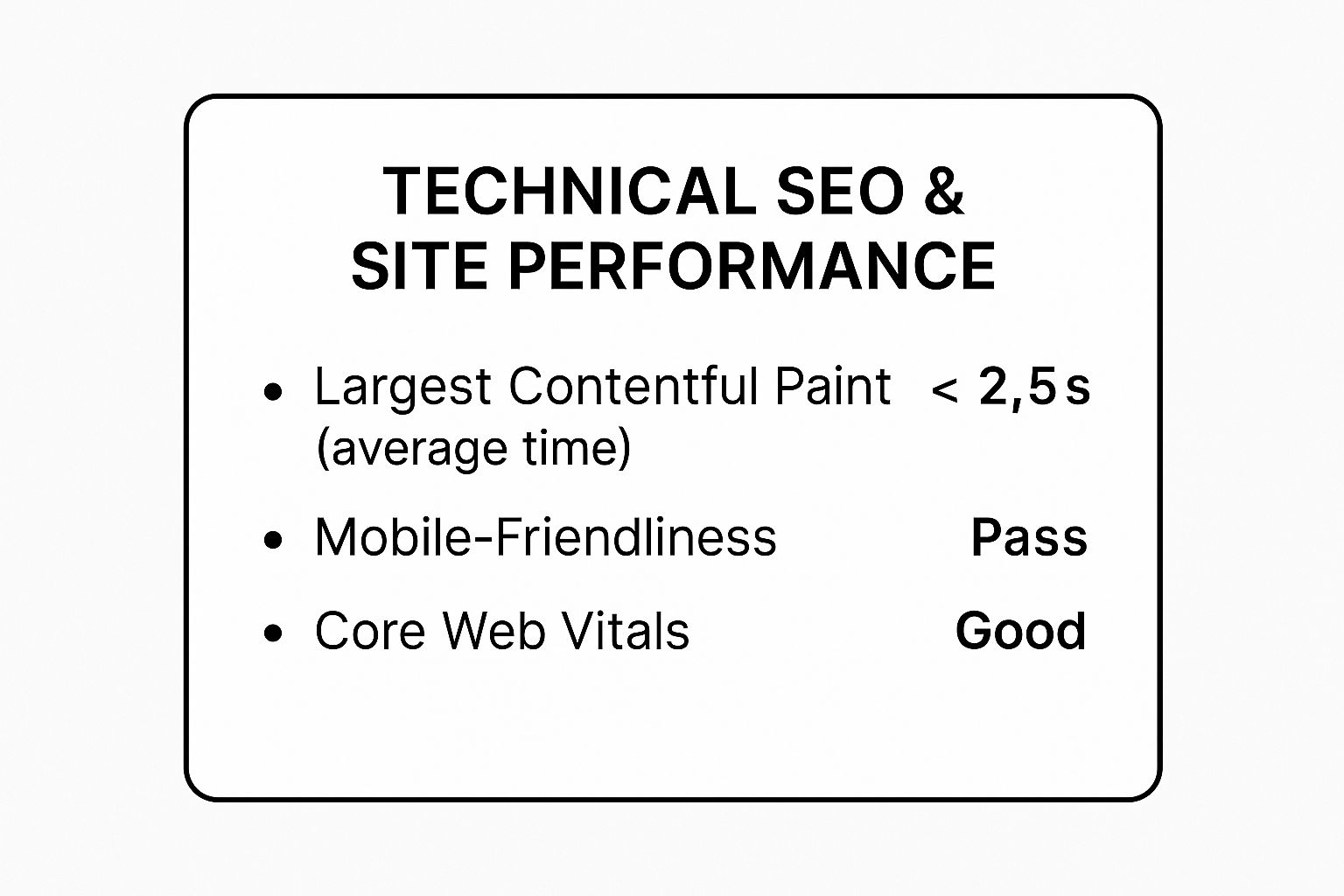
As the data shows, achieving a “Good” status in Core Web Vitals and passing mobile-friendliness tests are non-negotiable for modern SEO success.
How to Audit Technical Performance
To begin your audit, leverage free and powerful tools to get a clear picture of your site’s health.
Here are actionable steps you can take:
- Test Performance: Use tools like Google PageSpeed Insights and GTmetrix. They provide a detailed report on your site’s speed and offer specific recommendations for improvement.
- Optimize Images: Compress images and serve them in modern formats like WebP. Implement lazy loading so images and videos only load when they enter the user’s viewport.
- Leverage a CDN: A Content Delivery Network (CDN) distributes your website’s assets across a global network of servers, significantly reducing load times for users far from your primary server.
- Monitor Core Web Vitals: Regularly check your Core Web Vitals report in Google Search Console. This report tells you exactly which URLs need improvement for LCP, FID, and CLS.
Fixing these issues ensures search engines can efficiently access your content and that users have a seamless experience, regardless of their device.
For a deeper understanding and professional assistance with these complex tasks, you can learn more about Visibility Ventures’ Technical SEO services.
2. On-Page SEO and Content Quality
After solidifying your technical foundation, the next critical item on your website audit checklist is a thorough review of your on-page SEO and content quality.
On-page SEO involves optimizing individual web pages to rank higher and earn more relevant traffic from search engines. This includes elements you can control directly, like title tags, header structure, keyword usage, and the actual content on the page.
If technical SEO is the house’s foundation, on-page SEO is the interior design and layout.
It’s about making each room (page) purposeful, easy to navigate, and appealing to both visitors (users) and building inspectors (search engines). This audit ensures your content directly answers user queries, is structured logically, and provides demonstrable value.
Why It Matters
High-quality, well-optimized content is the cornerstone of ranking success.
For example, by creating comprehensive “pillar pages” and topic clusters, HubSpot saw a 30% increase in their organic traffic.
Similarly, Brian Dean of Backlinko popularized the “Skyscraper Technique,” a method of improving upon existing popular content, which has consistently helped websites achieve first-page rankings for competitive keywords.
These strategies prove that focusing on content relevance and strategic on-page optimization directly translates into higher visibility and traffic.
It’s not just about stuffing keywords; it’s about creating the best possible resource for a given search query, which search engines are designed to reward.
How to Audit On-Page SEO
To evaluate and improve your on-page elements, you’ll need a systematic approach that blends analysis with strategic content creation.
Here are actionable steps you can take:
- Analyze Search Intent: For each target keyword, analyze the top-ranking pages to understand the search intent. Are users looking for an informational blog post, a product page, or a comparison guide? Align your content format and information to match this intent.
- Optimize Core Elements: Ensure every page has a unique, compelling title tag and meta description that includes your primary keyword. Use header tags (H1, H2, H3) to create a logical structure that improves readability for both users and crawlers.
- Enhance Content Quality: Use tools like Clearscope or SurferSEO to identify semantic keywords and topics your audience expects. Focus on creating comprehensive, in-depth content that fully answers the user’s question, and regularly update older posts to maintain freshness.
- Implement Schema Markup: Add structured data, like FAQ or Article schema, to help search engines better understand your content and qualify for rich snippets in the search results, which can significantly improve click-through rates.
Auditing these on-page factors ensures your content not only exists but is also perfectly positioned to attract and engage your target audience.
To get expert help in refining these crucial page elements, you can find more information about Visibility Ventures’ On-Page SEO services.
3. User Experience (UX) and Navigation Analysis
The third pillar of a thorough website audit checklist involves analyzing your website’s User Experience (UX) and navigation.
This step evaluates how easily and intuitively visitors can interact with your site to achieve their goals.
A positive UX means users find what they need without frustration, leading to longer sessions, lower bounce rates, and higher conversions.
Think of your website’s navigation as the floor plan of a department store.
If the signs are confusing, the aisles are cluttered, and the checkout is hidden, customers will leave empty-handed.
A UX audit ensures your site’s layout is logical, accessible, and guides users smoothly from their entry point to their desired action, whether it’s making a purchase or filling out a form.

Why It Matters
A seamless user experience is directly tied to business success.
When Dropbox simplified its homepage to focus on a clear user journey, it increased conversions by a remarkable 10%.
Similarly, Airbnb’s mobile-first design approach streamlined the booking process, resulting in a 30% increase in mobile bookings.
These results prove that investing in UX isn’t just about aesthetics; it’s about removing friction and driving measurable outcomes.
How to Audit UX and Navigation
Start by putting yourself in your user’s shoes and analyzing their journey. You can gain immense insights by combining analytical tools with direct user feedback.
Here are actionable steps you can take:
- Analyze User Behavior: Use heatmap tools like Hotjar or Clarity to see where users click, scroll, and drop off. These visual reports reveal friction points in your navigation and on key pages.
- Conduct User Testing: Recruit members of your target audience to perform specific tasks on your website. Observe them and ask for feedback to identify confusing elements or frustrating processes.
- Simplify Navigation: Ensure your main menu is concise and uses clear, user-understood language. Implement breadcrumb navigation on sites with deep structures to help users understand their location.
- Test Forms and CTAs: Fill out every form on your website to check for unnecessary fields, unclear instructions, or technical errors. Make sure your calls-to-action (CTAs) are prominent and clearly state what will happen next.
- Check Accessibility: Use an automated tool like the WAVE Web Accessibility Evaluation Tool to check for compliance with WCAG standards. Ensure your site is navigable via keyboard and that all interactive elements are clearly defined for screen readers.
4. Security and Privacy Compliance
The fourth critical component of a comprehensive website audit checklist is an evaluation of your site’s security measures and privacy compliance.
This involves assessing data protection protocols, security infrastructure, and adherence to regulations like GDPR and CCPA.
A secure and compliant website protects your business from legal penalties and builds essential trust with your users.
Think of your website’s security as its digital immune system and its privacy policy as its legal constitution.
A weak immune system leaves it vulnerable to attacks like data breaches and malware, while a poor constitution can lead to severe legal and financial repercussions.
This part of the audit ensures you are not only protecting your digital assets but also respecting and safeguarding your users’ data.

Why It Matters
Neglecting security and privacy can be catastrophic.
For instance, British Airways was initially fined €204 million under GDPR for a data breach that exposed the personal and financial details of 500,000 customers.
Marriott International faced a £99 million ($124 million) fine after a breach compromised the data of 339 million guests.
These examples underscore the high stakes: robust security and privacy compliance are non-negotiable for protecting both your brand reputation and your bottom line.
How to Audit Security and Privacy
Auditing your security and privacy posture involves a mix of technical checks and procedural reviews. You can start by using automated tools and then move to manual verification of your processes.
Here are actionable steps you can take:
- Step 1- Implement an SSL Certificate: Ensure your site uses HTTPS to encrypt data transferred between the user’s browser and your server. This is a fundamental security requirement and a known Google ranking factor.
- Step 2 – Update All Software: Regularly update your CMS (like WordPress), plugins, and themes. Outdated software is one of the most common entry points for hackers.
- Step 3 – Enforce Strong Access Controls: Use two-factor authentication (2FA) for all administrative accounts and enforce strong password policies for all users with backend access.
- Step 4- Review Privacy Policies: Your privacy policy should be clear, up-to-date, and accurately reflect your data collection and processing activities. It must be easily accessible to all users.
- Step 5 – Conduct Regular Security Scans: Use security plugins or services like Sucuri or Wordfence to scan your site for malware, vulnerabilities, and blacklisting status.
By proactively addressing these security and compliance issues, you build a safer digital environment for your users and a more resilient business.
For expert guidance on securing your site and navigating complex compliance requirements, consider partnering with a dedicated security and SEO agency.
5. Analytics and Tracking Implementation
Another non-negotiable part of a thorough website audit checklist is a meticulous review of your analytics and tracking implementation.
This process involves verifying that your website is correctly collecting data on user behavior, conversions, and overall performance.
Accurate data is the bedrock of any successful digital strategy, allowing you to make informed decisions instead of relying on guesswork.
Think of analytics as your website’s nervous system. It tells you what’s working, what isn’t, and where users are getting stuck.
Without properly configured tracking, you’re flying blind, unable to measure the impact of your SEO efforts, marketing campaigns, or design changes. This audit ensures your data is clean, reliable, and actionable.
Why It Matters
Accurate tracking directly translates to better business intelligence and higher ROI.
For instance, Amazon’s sophisticated tracking and recommendation engine is so effective that it drives an estimated 35% of the company’s revenue.
Netflix leverages advanced analytics to personalize content suggestions, which significantly improves user retention.
These giants prove that when you understand user behavior through precise data, you can create experiences that drive conversions and loyalty.
Making data-driven decisions is what separates high-growth companies from the rest.
The audit ensures you have the correct information to optimize user journeys and maximize performance.
How to Audit Analytics and Tracking
To begin, you’ll need to dive into your analytics platform and use browser extensions to verify that tracking tags are firing correctly.
Here are actionable steps you can take:
- Verify Tag Implementation: Use tools like Google’s Tag Assistant to ensure that Google Analytics, Google Ads, and other marketing tags are installed correctly on every page. Check for duplicate or missing tags that could skew your data.
- Audit Goal and Conversion Tracking: Review your conversion goals in Google Analytics. Are they tracking the most important user actions, such as form submissions, purchases, or sign-ups? Perform test conversions to confirm they are firing and being recorded accurately.
- Use Google Tag Manager (GTM): If you aren’t already, migrate your tracking scripts to GTM. This centralizes tag management, making it easier to add, edit, and remove tracking codes without needing a developer. It also improves site speed by organizing how scripts load.
- Set Up Custom Dashboards: Create custom dashboards in your analytics platform that display the key performance indicators (KPIs) most relevant to your stakeholders. This makes it easy to monitor progress and report on what truly matters to the business.
6. Content Strategy and Information Architecture
After optimizing individual pages and technical elements, the next step in a thorough website audit checklist is to evaluate your site’s overall structure.
Content strategy and Information Architecture (IA) focus on how your content is organized, categorized, and presented, ensuring users can navigate intuitively and find what they need without friction.
A well-planned IA supports both user experience and SEO by creating logical pathways for crawlers and visitors alike.
Think of your website as a library.
Information Architecture is the system of aisles, sections, and cataloging that helps visitors locate a specific book quickly.
Without it, even the best content becomes lost in a disorganized collection.
This audit examines your site’s hierarchy, navigation, categorization, and internal linking to ensure everything is structured for maximum clarity and impact.
Why It Matters
A logical content structure directly correlates with user engagement and conversion rates.
For example, after a strategic content reorganization, MailChimp saw an 80% improvement in user task completion rates.
IBM’s overhaul of its content strategy led to a staggering 400% increase in lead generation.
These results prove that a user-centric information architecture doesn’t just improve usability; it drives significant business growth by guiding users toward their goals.
A clear structure helps search engines understand the relationships between your pages, distributing authority more effectively and improving your site’s overall topical relevance.
How to Audit Content and Architecture
Start by mapping out your existing site structure to identify complexities or dead ends. User behavior analysis tools can reveal where visitors are getting lost or dropping off.
Here are actionable steps you can take:
- Analyze User Flow: Use tools like Google Analytics to review Behavior Flow reports. Identify common user paths and see where they abandon their journey.
- Conduct Card Sorting: Engage actual users in a card sorting exercise. This technique, popularized by IA experts like Peter Morville and Louis Rosenfeld, helps you understand how your audience naturally groups topics, allowing you to build a more intuitive navigation system.
- Audit Content Performance: Review your content to identify what is performing well and what is outdated or irrelevant. A regular content audit ensures your IA remains clean and effective, free from low-quality pages that dilute your authority.
- Implement a Clear Hierarchy: Ensure your site structure is logical, typically with no more than three clicks required to get from the homepage to any other important page. Use breadcrumbs to help users orient themselves.
By refining your content strategy and IA, you create a seamless journey that meets user expectations and supports your SEO goals.
For expert guidance in aligning your content with a powerful site structure, you can learn more about Visibility Ventures’ content marketing services.
7. Conversion Rate Optimization (CRO)
Beyond attracting traffic, a crucial part of any website audit checklist is ensuring that traffic converts into meaningful action.
Conversion Rate Optimization (CRO) is the systematic process of increasing the percentage of website visitors who take a desired action, be it making a purchase, filling out a form, or signing up for a newsletter.
It’s about understanding user behavior and removing friction from their journey.
Think of your website as a physical store.
SEO gets people in the door, but CRO is the art of arranging the aisles, placing products strategically, and ensuring a smooth checkout process to maximize sales.
This audit focuses on analyzing user funnels, identifying drop-off points, and testing hypotheses to improve performance and drive revenue.
Why It Matters
A small uplift in conversion rate can have a massive impact on your bottom line without needing to spend more on acquiring traffic.
For example, President Obama’s 2008 campaign famously increased online donations by 40% simply by A/B testing their landing page’s media and call-to-action buttons.
Unbounce, a landing page platform, regularly sees clients improve conversion rates by over 30% through targeted page optimization.
These examples prove that CRO isn’t just a “nice to have”; it’s a direct lever for business growth. By methodically testing and refining your user experience, you turn more of your existing visitors into valuable customers.
How to Audit for Conversions
To begin your CRO audit, you’ll need a mix of quantitative data (analytics) and qualitative feedback (user behavior) to form educated hypotheses.
Here are actionable steps you can take:
- Analyze User Funnels: Use Google Analytics to set up and review conversion funnels. Identify where users are dropping off in the journey from landing page to conversion. Is it the product page, the cart, or the checkout form?
- Gather Qualitative Data: Implement tools like heatmaps (Hotjar, Crazy Egg) to see where users click and scroll. Use on-site surveys or user testing sessions to understand the “why” behind their actions and uncover pain points.
- Formulate a Hypothesis: Based on your data, create a clear hypothesis. For example: “Changing the primary call-to-action button color from blue to orange will increase clicks by 15% because it stands out more against our brand palette.”
- A/B Test Your Changes: Use A/B testing software (Google Optimize, VWO) to test one change at a time against the original version. This ensures you can attribute any performance lift directly to your change.
Optimizing your conversion paths ensures you’re making the most of every visitor. To explore how a structured CRO strategy can impact your revenue, you can review Visibility Ventures’ CRO services and pricing.
8. Competitive Analysis and Market Positioning
Understanding your own website is only half the battle; the next step in a thorough website audit checklist is to evaluate where you stand in the digital marketplace.
Competitive analysis involves a comprehensive review of your direct competitors’ online strategies, from their SEO rankings and content to their user experience and promotional tactics.
This process reveals their strengths, weaknesses, and the strategic gaps you can exploit.
Think of the digital landscape as a race.
A competitive audit is like looking at the other runners’ form, speed, and strategy.
By understanding what they do well and where they falter, you can adjust your own pace and find opportunities to overtake them.
This analysis is not about copying competitors but about identifying benchmarks and uncovering unique ways to differentiate your brand and provide superior value to your target audience.
Why It Matters
A deep competitive analysis provides a roadmap for outmaneuvering your rivals.
For example, Dollar Shave Club disrupted Gillette’s market dominance not by outspending them, but by analyzing their high-cost, retail-focused model and offering a simple, direct-to-consumer alternative with witty marketing.
Similarly, Zoom identified critical gaps in the user experience of existing video conferencing tools during the pandemic, allowing them to rapidly capture immense market share.
These cases demonstrate that understanding the competitive environment is crucial for identifying market needs and positioning your brand effectively. It transforms your strategy from guesswork into a data-driven plan for success.
How to Audit Your Competitive Landscape
Begin by identifying your top rivals and systematically deconstructing their digital presence using specialized tools and a clear framework.
Here are actionable steps you can take:
- Identify 3-5 Direct Competitors: Focus your efforts on a small, manageable group of your closest rivals for a deep and meaningful analysis.
- Use Competitive Intelligence Tools: Leverage platforms like Semrush or Ahrefs to gain comprehensive insights into your competitors’ keyword rankings, top-performing content, backlink profiles, and paid ad strategies.
- Analyze Content Gaps: Review the topics and formats your competitors use. Identify what high-value keywords they rank for that you don’t, and find subject areas they neglect where you can become an authority.
- Monitor Backlink Strategies: Examine where your competitors are earning high-quality backlinks. This can reveal potential link-building opportunities, such as guest posting on the same industry blogs or getting featured in similar resource lists.
By systematically evaluating your competition, you can refine your own SEO and content strategies to gain a significant advantage. To see how in-depth analysis can lead to measurable growth, review these examples of successful competitive positioning strategies.
Website Audit Checklist: Key Areas Comparison
| Audit Type | Implementation Complexity 🔄 | Resource Requirements ⚡ | Expected Outcomes 📊 | Ideal Use Cases 💡 | Key Advantages ⭐ |
|---|---|---|---|---|---|
| Technical SEO and Site Performance | High – requires technical expertise | Medium to High – developers needed | Improved rankings, faster load times, better UX | Large sites needing speed, crawlability, mobile optimization | Direct SEO impact, enhanced user experience |
| On-Page SEO and Content Quality | Medium – content specialists needed | Medium – ongoing content updates | Increased organic traffic, higher CTRs, featured snippets | Content-focused sites aiming for relevance and engagement | Better visibility, improved user engagement |
| User Experience (UX) and Navigation | Medium to High – design & testing required | Medium – user testing & tools | Higher conversions, lower bounce rates, accessibility compliance | Sites prioritizing usability and conversions | Increased satisfaction, brand trust |
| Security and Privacy Compliance | High – technical & legal complexity | Medium to High – security tools & audits | Data protection, legal compliance, trust, ranking benefits | Sites handling sensitive data, regulated industries | Risk mitigation, compliance, user trust |
| Analytics and Tracking Implementation | High – technical setup required | Medium – analytics tools & monitoring | Actionable data insights, data-driven decisions | Businesses needing performance and user behavior data | Improved ROI measurement, decision support |
| Content Strategy and Information Architecture | Medium – editorial & structural changes | Medium – content audits & organization | Better content discoverability, engagement, SEO support | Content-heavy sites requiring strong structure | Enhanced findability, increased engagement |
| Conversion Rate Optimization (CRO) | Medium to High – requires testing and design | Medium – A/B tools & analysis | Increased conversions, higher revenue, measurable ROI | E-commerce and lead-gen sites optimizing conversions | Direct revenue impact, optimized user paths |
| Competitive Analysis and Market Positioning | Medium – ongoing research and tools | Medium – competitive analysis tools | Strategic insights, prioritized optimizations | Businesses focusing on market positioning and growth | Identifies opportunities, informs strategy |
From Audit to Action: Your Next Steps to Digital Dominance
You have now worked through the essential pillars of a comprehensive website audit checklist.
This is not just a list of technical tasks and content checks; it is a strategic blueprint for sustainable digital growth.
By methodically dissecting your website’s technical foundation, on-page content, user experience, and competitive landscape, you have laid the groundwork for a more powerful, resilient, and high-performing online presence.
The true value of this process lies in understanding that a website audit is not a one-time fix. Instead, it is a cyclical, iterative discipline.
The digital ecosystem is in a constant state of flux: search engine algorithms evolve, competitor strategies shift, and user expectations change.
Your ability to regularly revisit this website audit checklist will be what separates you from the competition, allowing you to adapt, innovate, and consistently capture your target audience’s attention.
The insights gathered are your starting point, not the destination. The real work begins now, with implementation.
Prioritizing Your Audit Findings for Maximum Impact
The sheer volume of data and potential actions uncovered during an audit can be overwhelming.
The key to success is strategic prioritization. Not all findings carry the same weight, and trying to fix everything at once is a recipe for inaction.
To move forward effectively, you must translate your audit data into a prioritized action plan.
Start by categorizing your findings based on two critical factors: Impact and Effort.
- High-Impact, Low-Effort (Quick Wins): These are your top priorities. Tasks like fixing broken internal links, optimizing title tags for high-value pages, or compressing a few large images can often be completed quickly and yield noticeable results in traffic or user engagement.
- High-Impact, High-Effort (Major Projects): These are significant initiatives that will drive substantial growth but require considerable resources. This category might include a complete site architecture overhaul, a major content pruning and refresh project, or implementing a structured data markup strategy across your entire eCommerce catalog. These should be planned as longer-term projects with clear milestones.
- Low-Impact, Low-Effort (Incremental Improvements): These are smaller tasks that are good to address when time permits. Think of them as “housekeeping” items, such as updating alt text on older blog images or standardizing URL capitalization. Schedule these for slower periods or delegate them to team members.
- Low-Impact, High-Effort (Re-evaluate or Defer): These tasks should be placed at the bottom of your list. If a particular fix requires a massive development effort but is projected to have a minimal effect on your bottom line or SEO performance, it’s often wise to defer it or re-evaluate its necessity altogether.
By mapping your audit results into this matrix, you create a clear, actionable roadmap. This approach ensures you are always investing your resources where they will generate the greatest return, building momentum with quick wins while simultaneously planning for transformative, long-term projects.
The Path Forward: From Checklist to Competitive Advantage
Armed with this prioritized plan, your focus should shift to execution and measurement.
Assign clear ownership for each task, set realistic deadlines, and, most importantly, define the key performance indicators (KPIs) you will use to measure success.
Whether it’s an increase in organic traffic, a higher conversion rate on key landing pages, or an improved Core Web Vitals score, tying your actions back to measurable business outcomes is non-negotiable.
This comprehensive website audit checklist is your guide to transforming your website from a simple digital brochure into a powerful engine for growth. By committing to this process, you empower your business to not just compete, but to dominate in the digital arena.
Turning audit insights into tangible growth requires expertise and a data-driven process. If you’re ready to partner with an agency that has mastered this transformation, Visibility Ventures is here to help. Our proven six-step methodology begins with an exhaustive audit, and we have guided over 200 businesses to an average 150% increase in organic traffic. Let us help you convert your audit findings into your greatest competitive advantage.