


You can’t talk about good SEO without talking about site architecture. The two are completely intertwined. A website that’s a jumbled mess is a nightmare for search engines to crawl and an even bigger headache for users to navigate. Both of these problems will tank your search rankings.
Think of site architecture as the blueprint for your digital home. If there’s no logical plan, you end up with a confusing layout that hurts your visibility and frustrates visitors. The real goal here is to build a structure that instinctively communicates your content’s hierarchy and what’s most important.
Your Website’s Blueprint for SEO Success
Let’s try an analogy. Imagine your website is a huge library. If all the books were just thrown on the floor in random piles, with no signs or catalog system, people would walk in, get overwhelmed, and walk right back out. The librarian—in this case, Google—would have no idea how to categorize your collection or recommend it to anyone.
A messy library is an invisible one. And that’s exactly what happens when a website’s structure is an afterthought.

Your site architecture is that essential blueprint. It’s the internal framework that organizes all your content, dictating how pages are grouped, linked together, and ultimately presented to both humans and search engine crawlers. A logical structure guides users effortlessly to what they need and shows search engines exactly how your content is related.
Why Structure Is a Non-Negotiable Foundation
A solid architectural foundation isn’t just some “nice-to-have” feature; it’s a non-negotiable part of any serious digital strategy. Its impact ripples across several critical areas that make or break your online visibility.
When you get it right, a well-planned structure delivers three huge wins:
- Improved Crawlability: Search engine bots can find and index your important content efficiently. Nothing valuable gets lost in the digital clutter.
- Enhanced User Experience (UX): Visitors can find what they’re looking for without getting frustrated. This means lower bounce rates and more time spent on your site.
- Better Link Equity Distribution: Internal links act like pathways, spreading authority (often called “link juice”) from your strongest pages to others, giving them a much-needed ranking boost.
To give you a better sense of how these pieces fit together, here’s a quick breakdown of the core components of an SEO-friendly site architecture.
Core Pillars of SEO-Friendly Site Architecture
This table offers a quick overview of the essential components that form a strong site architecture and their direct impact on SEO performance.
| Pillar | Primary SEO Goal | Key Benefit |
|---|---|---|
| Logical Hierarchy | Help search engines understand content relationships and importance. | Clearer topic relevance and authority signals. |
| Intuitive Navigation | Improve user experience and reduce bounce rates. | Users can find information easily, increasing engagement. |
| Clean URL Structure | Create simple, descriptive URLs for users and crawlers. | Better user understanding and keyword relevance. |
| Internal Linking | Distribute PageRank and establish content context. | Boosts the ranking potential of deeper pages. |
| Crawlability | Ensure search engine bots can access and index all content. | Maximizes the visibility of your entire site in search results. |
Ultimately, this framework is how you build a website that both people and search engines will trust. And with a staggering 68% of all online experiences starting with a search engine, a clear structure is your first, most critical step to capturing that organic traffic.
A great site architecture tells search engines a story. It explains what your website is about, what information is most significant, and how different pieces of content relate to one another.
In the end, site architecture and SEO go hand-in-hand because one simply can’t work without the other. Neglecting this foundation is like building a house on sand. Sooner or later, everything will start to shift in the wrong direction. According to a recent report on SEO statistics, sites with strong technical foundations consistently outperform their competitors.
Choosing Between Flat and Deep Site Structures
Every website’s structure falls into one of two buckets, whether you planned it that way or not.
The choice between a flat site structure and a deep site structure is one of the most critical decisions you’ll make for your site, and it pulls the levers on both your SEO and user experience.
Getting this right is about building a foundation that can actually support your goals.
Think of a flat architecture as a cozy, single-story ranch house. From the front door (your homepage), every important room is just a few steps away.
This setup is all about simplicity and speed, making it a perfect fit for smaller websites, niche blogs, or businesses with just a handful of services.
The guiding principle here is to make sure a user never has to click more than a few times to get anywhere important.
A deep architecture, on the other hand, is more like a skyscraper.
It has dozens of floors (categories) and countless rooms (subpages) stacked on top of each other.
This model is a necessity for massive, complex sites like a major e-commerce store or a huge news portal.
It brings order to chaos through detailed categorization, but there’s a catch: if you’re not careful, important pages can get buried so deep that users and search engines give up trying to find them.
The Case for a Flat Site Architecture
A flat site structure aims to keep every page within three to four clicks of the homepage.
This is a huge win for SEO, and for a couple of big reasons.
First, it lets link authority—what we often call “link juice”—flow more easily from powerful pages like your homepage down to your other content. This simple act of distribution can give your product or service pages a serious ranking advantage.
Second, a flat structure makes life much easier for search engine crawlers. With fewer layers to dig through, Google can discover, index, and make sense of all your content way more efficiently. This helps you get the most out of your crawl budget, ensuring search engines aren’t wasting their time and resources trying to find pages you’ve hidden ten clicks deep.
- Best for: Small businesses, portfolio sites, blogs, and any site with fewer than a thousand pages.
- Key Advantage: Spreads link equity effectively and makes your site a breeze to crawl.
- Example: Imagine a local bakery’s website. “Cakes,” “Cookies,” and “Contact Us” are all right there in the main menu, one click from the homepage. Simple and effective.
The “three-click rule” is a classic user experience guideline that says a user should be able to find anything they’re looking for in three clicks or less. It’s not a hard-and-fast SEO rule, but it’s a brilliant principle for keeping your site intuitive and user-friendly.
This image really drives home how a well-thought-out site architecture has a domino effect on key SEO outcomes.
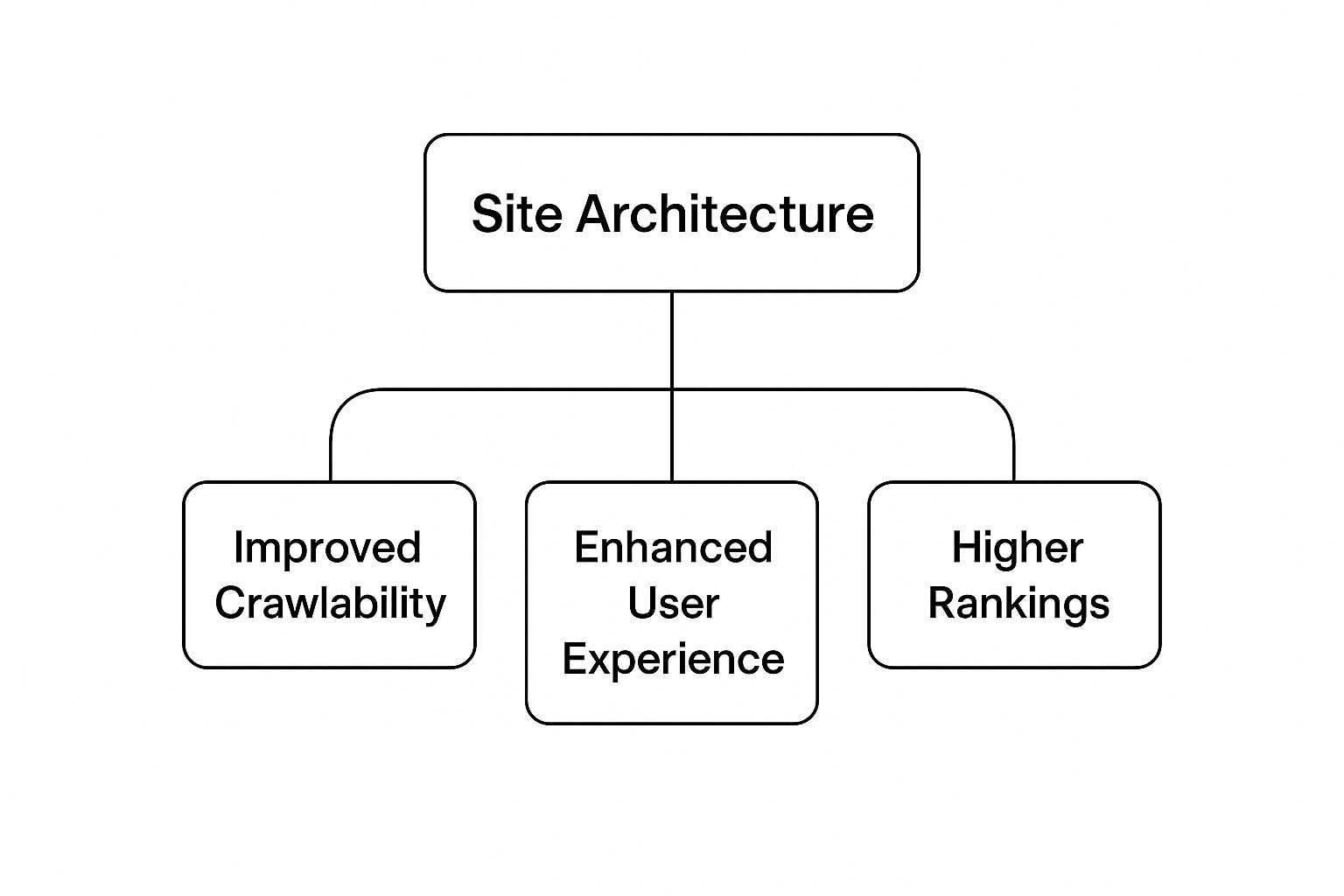
As you can see, the benefits build on each other. It starts with better crawl efficiency, which leads to a smoother user journey, and ultimately results in stronger rankings across the board.
When a Deep Site Architecture Is Necessary
While a flat structure sounds great on paper, it’s just not realistic for every website. An e-commerce giant with tens of thousands of products can’t possibly use a flat structure without creating a navigation nightmare for its users. This is where a deep structure, when done right, becomes absolutely essential.
A deep architecture relies on a crystal-clear system of categories and subcategories to guide users on a logical path.
For instance, a user’s journey might look like this:
Homepage > Electronics > Laptops > Gaming Laptops.
Sure, it takes more clicks, but it creates a structured experience that helps people find exactly what they’re looking for without getting overwhelmed.
The secret to making a deep structure work is a rock-solid internal linking strategy.
By creating smart links between categories, subcategories, and related products, you can still pass authority around the site and make sure no page gets left behind or “orphaned.”
Building these internal connections is a fundamental part of many successful link building services, as it ensures even the deepest pages get the authority they need to show up in search results. It’s all about finding that balance between clear organization and strong search visibility.
Crafting URLs That Guide and Inform
Long before anyone even lands on your page, they see a critical piece of your site’s structure: the URL.
It’s far more than just a web address.
Think of it as a digital signpost that sets expectations for both real people and search engine crawlers.
A well-crafted URL provides a clear, logical path that instantly communicates your site’s hierarchy and what the page is all about.
Let’s go back to our library analogy.
Your URLs are the labels on the aisles and shelves.
A messy, cryptic label like site.com/p?id=481 tells visitors absolutely nothing.
It’s confusing, unhelpful, and gives zero context about the page’s content. That ambiguity is a massive missed SEO opportunity.
Now, look at a clean, descriptive URL like site.com/services/mens/shoes.
It instantly tells a story.
Everyone—from Google to your potential customer—knows this page is about “shoes,” which is in the “mens” category, all found under the main “services” section.
This kind of structure feels intuitive, trustworthy, and is packed with valuable SEO signals.
Principles of SEO-Friendly URL Structure
Building great URLs isn’t about guesswork; it’s about following a few consistent, logical principles that make life easier for both users and search engines. When you get these right, your URLs work for you, not against you, strengthening your overall site architecture and SEO.
Here are the core rules to live by:
- Keep Them Short and Simple: Let’s be honest, nobody wants to copy and share a mile-long URL. Shorter URLs are easier to read and less intimidating, and some studies have even found a correlation between shorter URLs and higher rankings.
- Use Keywords Naturally: Your primary keyword belongs in the URL slug. If your page is about “blue running sneakers,” the URL should look something like
site.com/shoes/blue-running-sneakers. It just makes sense, and it reinforces the page’s topic for search engines. - Choose Hyphens Over Underscores: This is a big one. Google’s own guidelines are clear: use hyphens (
-) to separate words. Search engines read hyphens as spaces, but they often jam words together when they see an underscore (_), which can mess up how they interpret your keywords. - Maintain Consistency: Pick a URL structure and stick with it across your entire site. This predictability helps users and crawlers understand how your content is organized, making your site feel more professional and reliable.
Your URL is often the first thing a user sees in the search results. A clean, readable URL can be the deciding factor that gets you the click, because it builds trust and clearly signals that your page is relevant to their search.
Static vs. Dynamic URLs
Another key distinction is between static and dynamic URLs.
Static URLs, like the good examples we’ve been using, are fixed and contain readable text.
Dynamic URLs are a different beast entirely. They’re usually generated on the fly by scripts and databases, resulting in messy strings of parameters and symbols.
The difference is night and day:
| Type | Example URL | SEO Friendliness |
|---|---|---|
| Static | mysite.com/blog/seo-best-practices | High: Readable, keyword-rich, and easy to remember. |
| Dynamic | mysite.com/page.php?cat=5&id=92 | Low: Unreadable, offers no context, and looks untrustworthy. |
Sure, modern search engines have gotten much better at crawling dynamic URLs than they used to be, but a static structure is still the gold standard for SEO.
It’s clean, user-friendly, and sends clear signals about your content.
Luckily, most modern content management systems like WordPress make this easy by letting you set up “pretty permalinks” that automatically create static, descriptive URLs for every new page.
When you treat your URLs as a fundamental part of your site’s foundation, you create a more coherent experience for everyone. Each well-structured URL becomes a small but mighty asset, guiding crawlers efficiently and assuring users they’re in the right place.
Weaving a Web of Authority with Internal Links
Think of your site’s architecture as the blueprint for a library.
If that’s the case, then internal links are the hallways, signs, and staircases that connect every single room.
They’re the secret weapon of smart SEOs, acting like a circulatory system that pumps authority and relevance all throughout your website.
A well-thought-out internal linking plan does two things at once: it guides your visitors and search engine crawlers straight to your most important content, and it sends a clear signal about which pages you consider the most valuable.
This isn’t just about dropping links wherever you can. It’s a calculated effort to weave a web that strategically passes around “link equity”—often called “link juice”—from your strongest pages to others that need a boost.
When a page with high authority links to another page, it’s essentially giving it a vote of confidence in Google’s eyes, passing along some of its strength.

This entire process is how you establish your website as a go-to resource on your core topics. By building these connections, you’re showing search engines how all your content fits together, which in turn builds topical authority and helps your key pages climb the search rankings.
Building Authority with Pillar Pages and Topic Clusters
One of the absolute best ways to organize your internal links is the Pillar Page and Topic Cluster model.
It’s a game-changer that can transform your site from a random collection of articles into a highly organized, authoritative knowledge hub.
Here’s the breakdown:
- Pillar Page: This is your big, comprehensive guide on a broad topic. Think of it as the ultimate resource or the main chapter in a book (e.g., “The Complete Guide to Digital Marketing”).
- Topic Clusters: These are shorter, more focused blog posts that dive deep into specific subtopics related to the pillar (e.g., “Getting Started with Email Marketing,” or “Advanced Social Media Advertising Tactics”).
- The Links: Here’s the magic. Every single cluster post links up to the main pillar page. At the same time, the pillar page links out to each of its supporting cluster posts. This creates a powerful, tightly-knit structure.
This model makes it crystal clear to Google that your pillar page is the definitive resource on that subject, backed up by a ton of detailed, related content. It’s a very deliberate way to signal expertise and improve your site’s overall SEO performance.
Mastering Anchor Text for Maximum Impact
That clickable text in a hyperlink? That’s called anchor text, and it’s a seriously important signal for SEO.
It tells both users and search engines what the destination page is about before they even get there.
Using generic anchor text like “click here” or “read more” is a huge missed opportunity.
Think of descriptive anchor text as a signpost on a hiking trail. It tells you exactly where the path is heading, which builds trust and gives search crawlers valuable context about the relationship between the two pages.
Your anchor text should be descriptive and, when it makes sense, include relevant keywords.
So instead of a link that just says “learn more,” you’d want something like “check out our guide on on-page SEO best practices.”
A natural, descriptive anchor text profile across your site reinforces the topical relevance of your pages, making your internal links work much harder for you.
For instance, you can learn more about the fundamentals of on-page SEO to see how anchor text fits into the bigger picture.
Finding Opportunities and Avoiding Critical Errors
A healthy internal linking strategy isn’t a “set it and forget it” task—it needs regular attention.
Broken internal links are a big problem, creating dead ends for both your visitors and for search crawlers.
When you consider that over 66% of backlinks found on websites are broken, you can see why keeping your own internal links in good shape is so important for protecting your site’s authority.
To build a solid network of links, you have to steer clear of two major mistakes:
- Orphan Pages: These are pages that have zero internal links pointing to them. If you don’t link to a page, search engines will struggle to find it and will assume it’s not very important.
- Link Hoarding: This happens when a page gets a lot of internal links but doesn’t link out to any other relevant pages on your site. This effectively stops the flow of link equity in its tracks, isolating valuable content.
Running regular site audits with an SEO tool is the best way to catch and fix these issues. By finding your orphan pages and building relevant links to them, you ensure every piece of content is pulling its weight and contributing to your site’s overall strength.
Guiding Crawlers With Sitemaps and Robots.txt
If you think of your site architecture as the blueprint for your digital house, your XML sitemap and robots.txt file are the instructions you hand to the builders—in this case, the search engine crawlers.
These two simple files work hand-in-hand to tell search engines exactly how to explore your website, making sure they spend their time and resources in all the right places.
An XML sitemap is basically a detailed map of your website.
You create this map and give it directly to search engines like Google, showing them a complete list of every single important URL you want them to find and index. It’s your way of saying, “Hey, here are all the valuable pages on my site. Please don’t miss a single one.”
On the other hand, a robots.txt file is more like a set of “Do Not Enter” signs.
This plain text file sits in your site’s main directory and tells crawlers which areas to avoid completely. This is incredibly useful for keeping them out of non-public sections like admin login pages, messy internal search results, or duplicate content zones.
The Role of XML Sitemaps
An XML sitemap is one of the best tools you have for improving how efficiently search engines crawl your site.
It helps them discover your new content much faster and get a better grip on your site’s structure, which is especially important for larger websites or sites with pages that aren’t well-linked internally.
A well-crafted sitemap ensures that even your deepest, hardest-to-find pages get noticed. It also lets you add extra, helpful details about each URL, such as:
- Last Modified Date: Tells crawlers when the content was last updated.
- Change Frequency: Gives a hint about how often a page is likely to change.
- Priority: Suggests which pages you consider most important compared to others.
A well-managed sitemap is a non-negotiable part of good site architecture and SEO. It takes all the guesswork out of the crawling process and gives search engines a clear, direct path to your best content, ensuring nothing gets overlooked.
Managing Crawlers With Robots.txt
While a sitemap rolls out the welcome mat for crawlers, the robots.txt file sets the ground rules.
Without it, search engine bots might waste their limited “crawl budget” indexing low-value pages, which can water down the perceived quality of your entire site. Worse, it could lead to sensitive information accidentally showing up in search results.
But you have to be careful here. A classic mistake is accidentally blocking critical resources like your CSS or JavaScript files. If you do that, you prevent Google from being able to render your pages correctly, which can absolutely tank your rankings.
For tricky situations like this, getting expert help with your technical SEO management can save you a world of headaches.
Sitemaps and Structured Data
While sitemaps guide crawlers to your pages, another critical piece of the puzzle—structured data—helps them understand what’s on those pages. Structured data is a standardized format for labeling your page’s content, almost like adding little descriptive tags. For example, you can use it to identify recipes, product reviews, or events.
It’s surprisingly underused, yet so important. A recent study found that over 23% of websites don’t use any structured data tagging at all. Of those that do, 49.7% use JSON-LD, which just so happens to be Google’s preferred format for enabling rich results like star ratings or FAQ snippets right in the search results.
By combining a clean, comprehensive sitemap with proper structured data, you’re not just showing crawlers where to go—you’re giving them a crystal-clear understanding of what they find when they get there.
XML Sitemap vs Robots.txt A Quick Comparison
Understanding the distinct roles of these two essential files is key to guiding search engine crawlers effectively. While they both communicate with search bots, they serve very different purposes.
| Feature | XML Sitemap | Robots.txt File |
|---|---|---|
| Purpose | To encourage crawling by listing all important URLs. | To discourage crawling of specific files or directories. |
| Who is it for? | Submitted directly to search engines (e.g., Google, Bing). | Read by all web crawlers that visit your site. |
| Format | An XML file with a specific, structured format. | A simple plain text file (.txt). |
| Core Function | Inclusion: “Please crawl these pages.” | Exclusion: “Do not crawl these areas.” |
| Analogy | A detailed map of all the interesting places to visit. | A series of “Keep Out” and “Private Property” signs. |
In short, the sitemap is your way of saying “Welcome, here’s everything you need to see,” while the robots.txt file says, “Thanks for visiting, but please stay out of these specific areas.” Using both correctly is fundamental to a healthy technical SEO strategy.
Future-Proofing Your Site for Mobile and Voice
If your site architecture was built only with desktop users in mind, it’s already a relic. Today’s world is all about smaller screens and spoken commands, which means your site’s structure has to work for a mobile-first, voice-activated reality. This isn’t just about having a responsive design anymore; it’s a fundamental rethink of how you organize and serve up information.
Mobile users are impatient.
They demand speed and simplicity. A slow-loading page or confusing navigation is an instant deal-breaker, sending bounce rates soaring and telling search engines your site isn’t user-friendly.
Your architecture has to be lean, creating efficient paths that get people what they need with zero friction.
That same need for speed and clarity is even more vital for voice search. When someone asks Alexa or Google Assistant a question, they aren’t browsing—they’re looking for one, direct, definitive answer. Those answers are almost always pulled from well-structured pages that present information in a clean, straightforward way.
Structuring Content for Spoken Queries
To win at voice search, your content needs to be “speakable.” That means breaking down information into bite-sized chunks that directly answer the kinds of questions people ask out loud. Your internal linking is still important, of course, but the content itself has to be formatted for a bot to read.
Get in the habit of thinking in questions and answers. A few strategies work wonders here:
- Use FAQ Schema: This structured data is like a beacon for search engines, signaling that you have content formatted specifically as questions and answers. It’s a fast track to getting picked up for voice search results.
- Write Concise Paragraphs: Short, direct sentences are just plain easier for voice assistants to parse and read aloud without sounding like a robot.
- Leverage Headings: Use your H2s and H3s to pose common user questions. This helps organize the content for both crawlers and voice tech.
The rise of voice search has completely changed the game for local SEO. Your site architecture now has to serve people asking their phones for directions, hours, and recommendations while they’re already on the move.
The Overlap Between Mobile and Voice SEO
You can’t separate mobile optimization from voice search—they’re two sides of the same coin.
Consider this: a staggering 72% of consumers use voice assistants to find local businesses. And 76% of those voice searches include “near me” or other location-specific terms.
This shift in behavior is huge.
It forces us to put mobile usability first, especially since 58% of people are using voice search to get local business details while they’re out and about.
You can dig deeper into these numbers by reading the full research on modern search behavior.
At the end of the day, future-proofing your site architecture is all about building for convenience. Whether someone is tapping on a tiny screen or asking their smart speaker a question, they want a fast, direct, and helpful answer.
A successful content marketing strategy has to be built on a technical foundation that can deliver that experience, no matter the device. Your architecture needs to be solid enough for today and resilient enough for a future where mobile and voice queries are just how things are done.
Common Questions About Site Architecture and SEO
Even with a solid plan, putting site architecture principles into practice can bring up some tricky questions.
Let’s walk through some of the most common ones that come up when tying structure to SEO, so you can move forward with confidence.
How Long Until I See SEO Results?
This is the big one, isn’t it? After a major architectural overhaul, you have to be patient.
We’re not just tweaking a title tag here; we’re changing the very foundation of your site. Search engines need time to crawl everything again, process the new structure, and figure out how all your pages relate to each other now.
You’ll probably see some initial movement in your crawl stats within a few weeks. But for the needle-moving ranking improvements, you should realistically expect it to take three to six months. That timeline can shift depending on how big your site is, its crawl budget, and just how tangled the old structure was.
Is a Flat or Deep Architecture Better?
Ah, the classic debate.
But here’s the thing: there’s no single “best” answer.
The right choice is all about what makes sense for your website’s size and complexity.
- Flat Architecture: This is perfect for smaller sites, like blogs or local business websites. The idea is to get to any important page within three or four clicks from the homepage. It’s fantastic for spreading link authority around efficiently.
- Deep Architecture: If you’re running a massive e-commerce store or a huge news portal with thousands of pages, you need a deep structure. Without logical categories and subcategories, it would be pure chaos.
The goal isn’t just to pick “flat” or “deep.” The goal is to be logical. Your structure has to match your content and serve your users.
The biggest mistake you can make is not choosing a structure at all.
An “accidental” architecture, where pages are just added haphazardly, creates dead ends for users and sends confusing signals to search engines. A deliberate, organized structure always wins.
What Is the Biggest Mistake to Avoid?
Without a doubt, the most damaging mistake is creating orphan pages.
These are pages that have zero internal links pointing to them.
To search crawlers and users, they might as well be invisible.
If a page isn’t linked to from anywhere else on your site, search engines assume it’s not important and will have a tough time ever finding, let alone indexing it.
You absolutely must audit your site for orphan pages on a regular basis.
Make sure every piece of content has a logical home in your hierarchy.
This is non-negotiable for building a site that search engines can trust. And with Google owning over 92% of the search engine market, playing by their rules with a solid, interconnected site is just smart business.
If you want to dig into those numbers, you can explore more insights on search engine statistics.
Ready to build an SEO foundation that drives real growth? Visibility Ventures creates data-driven strategies that turn your website’s architecture into a competitive advantage. Get a free, comprehensive SEO audit and see how we can boost your rankings and revenue.
Start your journey to the top of the search results at https://visibilityventures.co.